Chat Messenger

Guide for transfering money

Update time 11:35 - 19/03/2014


Jump to perfection, free money between accounts Pay VTC electronics for the operation very simple :

Step 1 : Log In VTC Pay e-wallet at : http://www.vtcpay.vn

Step 2 : Customers select " e-wallet " - > click on " transfer money " and enter the full remittance information :
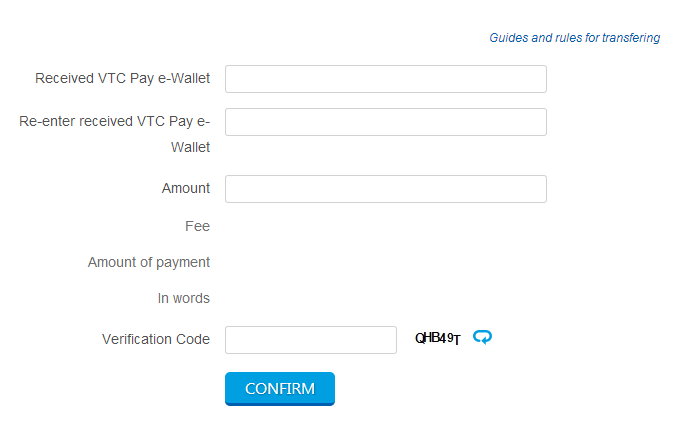


Step 3 : After pressing "Confirm " , VTC Pay system will automatically send the first notification message ODP password to register the phone number of the customer account .

Note: Password ODP value used in 24
Customers enter password ODP has received in the " Confirm Password ODP "
After logging in ODP , customers press "Confirm "

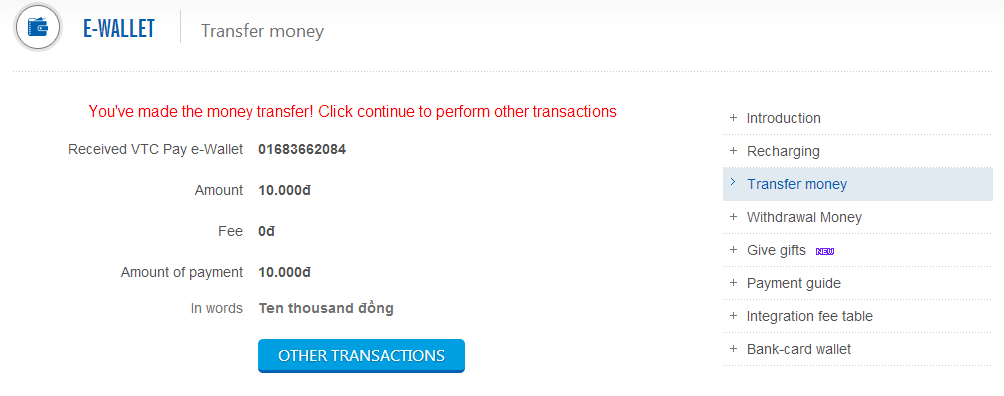
Step 4 : Transaction completed . Web interface will announce that transfers were successful and the money has been transferred to the account to transfer requests .
 

ODP authentication code sent to your phone number in the first transaction , valued at 24 hours and can be reused in other transactions in the period of validity . In case you do not remember getting ODP or ODP , ... please click on the " Get authentication code " or send the message syntax PG ODP send 19001530 to request the system to send a new verification code .

VTC Pay
True payment, True value

Top